Workday for a Weekday - Cybersecurity Training and Awareness
Technologies Used
Development Time
6 months
Project Status
Completed
Repository
View on GitHubProject Overview
Most people know cybersecurity matters. Most people still get phished.
The problem isn't a lack of information: it's that traditional training doesn't stick. Campaigns inform. Courses certify. Neither creates the kind of practical, memorable experience that actually changes behaviour. At least that's what 85% of companies believe despite spending so much money yearly to train their employees not to click on a link for a free holiday, or leave their computer open and unmanned when going on break. And you can't exactly let someone experience a real data breach for the sake of a lesson.
That gap is what this project set out to close.
Workday for a Weekday is a 2D RPG built in Unity, designed to teach cybersecurity awareness through scenario based gameplay rather than plain information recital. Players step into the role of Steve, a new hire at Corpo, a company quietly falling apart from the inside, where colleagues sabotage each other, management is negligent, and every workday brings a new wave of cyber threats to navigate.
The game covers phishing, social engineering, spoofing, insider threats, brute force attacks, and man-in-the-middle attacks. Not just as topics to memorise; the game itself is built around them mechanically and narratively. A live email inbox where players must distinguish legitimate messages from deceptive ones, a passcode scanner that penalises weak passwords in real time, a deteriorating Wi-Fi connection that mirrors unsecured network risks, and roaming NPCs who will exploit an unlocked computer the moment you even THINK of stepping out of your cubicle to do anything else. All of these will train you to use the knowledge you're being given at each level.
The results backed it up. After playing, participants showed a 34% average increase in cybersecurity knowledge, a 76% improvement in threat recognition, and perhaps most tellingly, 100% said they preferred this method of learning over reading, lectures, seminars, and video content. Even participants who already had formal cybersecurity training.
The Problem
Cybersecurity is one of those topics everyone agrees matters... and almost nobody engages with voluntarily. The threat landscape is expanding constantly, with new users, new platforms, and new attack methods emerging every day. And yet, despite years of awareness campaigns and training programs, human error remains the leading cause of most data breaches, both personally and professionally.
Most cybersecurity education; be it a campaign poster, an online course, or a workplace training module, is almost entirely focused on just informing. It tells you what phishing is. It explains what a strong password looks like. But information without the practical experience of applying it under pressure, rarely changes behaviour. You can know exactly what a phishing email looks like and still click the wrong link on a busy Tuesday morning.
Second, cybersecurity is uniquely difficult to practice. Unlike learning to drive, where the consequences of mistakes are immediate and real, you can't safely put someone in front of a genuine cyber threat just to teach them a lesson. That gap between knowing and doing is where most training falls short.
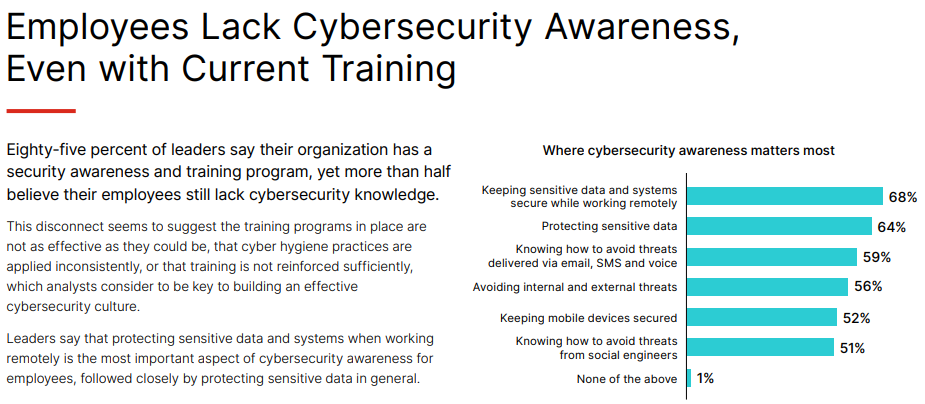
"Fortinet 2023 Security Awareness and Training Global Research Brief" (Fortinet, 2023)
🔍 Did you know?
- 85% of organisations have a cybersecurity training program in place, yet almost 60% of business leaders believe their employees still lack cybersecurity awareness.
- Phishing, malware, and password attacks remain the most common methods used by attackers, all of which target human habits rather than technical vulnerabilities.
- Research shows that cramming information to pass a certification test actively harms long-term knowledge retention (who could have guessed).
So what is being done about this? Awareness campaigns do a decent job of simplifying information. Posters, videos, short form content; they can be catchy, but they struggle to make the information feel relevant or urgent to the average person. Training courses go deeper, but they're dependent on the learner's motivation, and when the goal is a certificate rather than genuine understanding, the knowledge rarely sticks.
“Effective influencing requires more than simply informing people about what they should and should not do: they need, first of all, to accept that the information is relevant, secondly, understand how they ought to respond, and thirdly, be willing to do this in the face of many other demands” - (Bada, Sasse and Nurse, 2019).
The Role of Serious Games
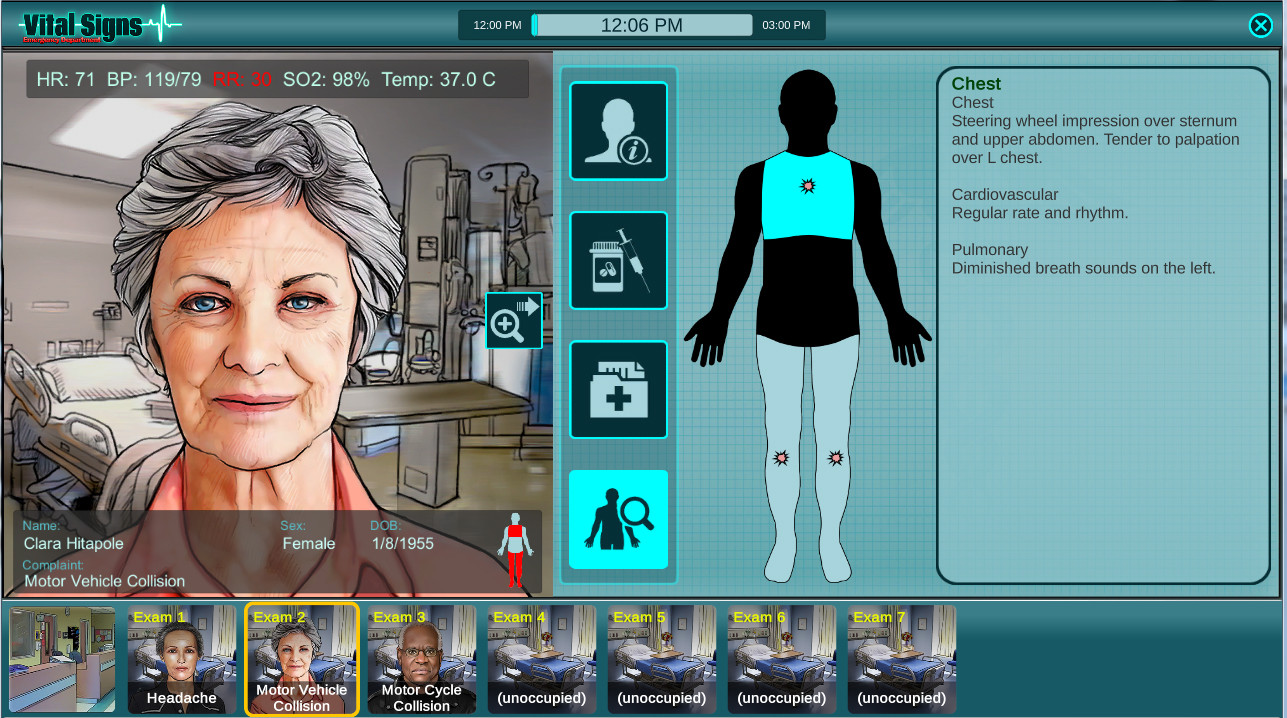
Screenshot from "Vital Signs: ED" by BreakawayGames
📋 Serious Games
"Digital games or simulations designed with a primary purpose beyond pure entertainment, focusing instead on education, training, healthcare, marketing, or behavioural change."
So why a simulation game? Games are not new to the field of education and training. Your first thought might be those simple numbers games that kids might play on a tablet, but serious games stand tall in even some of the most stressful, high-level work environments you can think of. Take Vital Signs: ED, a simulation game built around working in a hospital emergency department. It mimics a real high-stakes situation, giving players a risk-free environment to build instincts that transfer directly to real practice. Studies have shown it measurably improves the real-world performance of professionals, including surgeons, in genuine medical situations.
Here we see the core idea: Creating an experience that can simulate something in the real world. This is where both cybersecurity campaigns and training often falls short, both solely aim to try and relay important information without giving that information any practically or immediate usage that would attribute value to it. When we learn to drive, information is constantly put into practice as we try to safely operate a vehicle that is both carrying us to our destination and protecting us from all the other high speed metal wagons on the road. I'm sure that the fastest way to deeply ingrain the important of cybersecurity into somebody is allowing them to get hacked and lose all their assets, but we both know why that is not sustainable.
Serious games are not perfect though, most of them almost never escape the room they were built for. They tend to live exclusively in formal settings; used by organisations already convinced of their value, and rarely by anyone else. No distribution in commercial game stores, no replay value, no reason to return once the training is done. Compare that to something like Wii Fit™, a game built around fitness that found a massive audience far beyond the gym, simply because Nintendo remembered it also had to be fun. If a serious game is going to reach people who aren't already looking for it, it has to earn their attention as a game first, and teach them second. This is where I introduce you to my solution...
Design Decisions

Screenshot from "Workday for a Weekday" by yours truly.
🔍 Did you know?
The United Kingdom has the highest proportion of people named Steve of any country in the world, roughly 0.55% of the population. That's approximately 368,000 Steves currently living in Britain.
...meet Steve.
Steve is a new hire at Corpo, a company that on the surface, looks like any other office job. But underneath, it's a workplace quietly tearing itself apart. Employees sabotage each other to get ahead, management turns a blind eye to everything, and every single workday brings a fresh wave of cyber threats that Steve has to navigate just to keep his job. Players step into his shoes and experience a week at Corpo, with each day introducing new challenges, new mechanics inspired by real cyber threats, and a story that gets progressively harder to ignore as it directly impacts gameplay.
The workplace setting puts the player in exactly the kind of environment where cybersecurity threats reside, and where the consequences of poor decisions are felt the most. The narrative is purposefully on the nose, as it sets up a setting that will bombard the player with situations where cybersecurity is at risk, and reinforce the best preventative measures.
Identifying Common Threats
Before any mechanics were designed, the scope of what the game needed to teach had to be defined. The goal was to identify the specific attacks and human errors most responsible for real-world breaches, and use those as the foundation for the game's design. Research into industry reports and existing training programs pointed to a consistent set of threats:
| Threat | Description |
|---|---|
| Malware | Software designed to damage or infiltrate a system. Includes viruses, ransomware, trojans, and spyware. |
| Phishing | Attackers impersonate trusted entities via email, text, or fake websites to steal sensitive information. |
| Spoofing | Impersonating another source (an email address, a website, a caller ID) to deceive users or gain unauthorised access. |
| Brute Force / Weak Passwords | Systematically guessing passwords until the correct one is found. Simple or repeated passwords make this trivially easy. |
| Insider Threats | Individuals within an organisation, intentionally or accidentally, misusing access to compromise systems or data. |
| Man-in-the-Middle | A third party secretly intercepts communication between two parties, often over unsecured networks. |
| Social Engineering | Manipulating people psychologically into divulging information or granting access, without any technical exploit. |
A notable observation during this stage was how much overlap exists between these threats. Phishing frequently delivers malware. Spoofing is often used in conjunction with social engineering. Weak passwords make brute force attacks significantly easier. Where threats naturally connected, the design grouped them together, which also informed how mechanics were structured and layered.
From Threat to Game Mechanic
With the threat landscape defined, each one needed to be translated into a gameplay mechanic that players could actively experience. The following outlines each mechanic, the threat it was designed to represent, and what behaviour it was intended to train.
The Email System: Phishing, Spoofing & Social Engineering
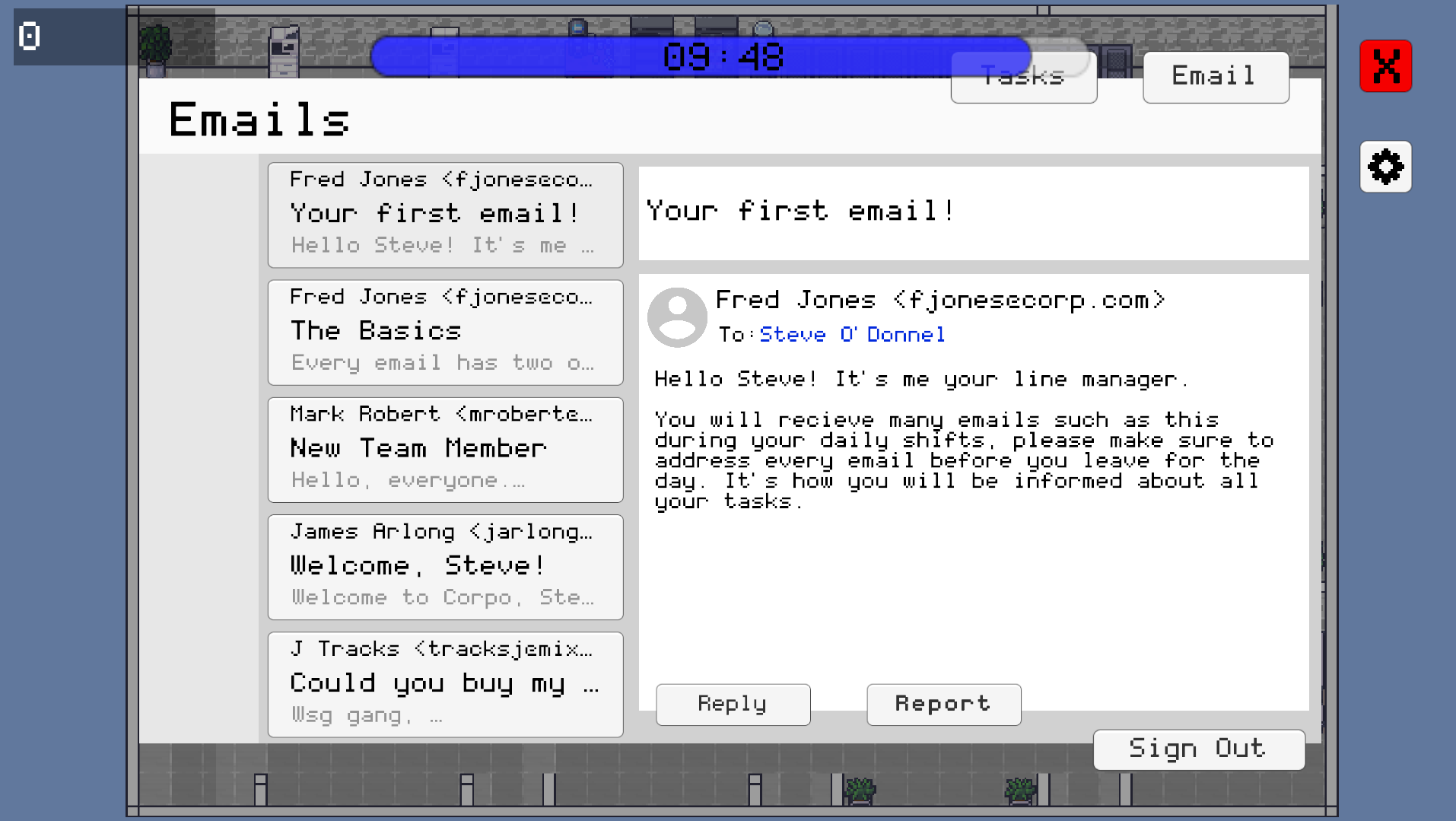
Screenshot of the computer UI in Unity, displaying the email screen
The email system is the core gameplay mechanic. Each level, the player receives a set number of emails that must be cleared from the inbox within the time limit. Emails are a mix of legitimate company correspondence and malicious ones, and the player must respond to each with one of two options: Reply or Report.
Identifying the correct response requires attention to detail. Legitimate company emails use the @corpo.com domain. Spoofed emails use near identical variations of the domain. Some emails originate from real employees but contain malicious content or requests, while others may appear suspicious but are genuine. This diversity trains players to assess the full context of a message rather than rely on surface level info.
| Sender | Email Message | Correct Action |
|---|---|---|
| fjones@corpo.com | "Please enable two factor authentication here:" | REPLY |
| fjones@corpol.com | "Please enable two factor authentication here:" | REPORT |
| fjones@corpo.com | "Please send me your account details." | REPORT |
Certain emails trigger an additional compose-email minigame, where the player must select the correct recipient and attach the correct file before sending. Selecting either field incorrectly results in a point deduction, representing the real-world risk of misdirected sensitive information.
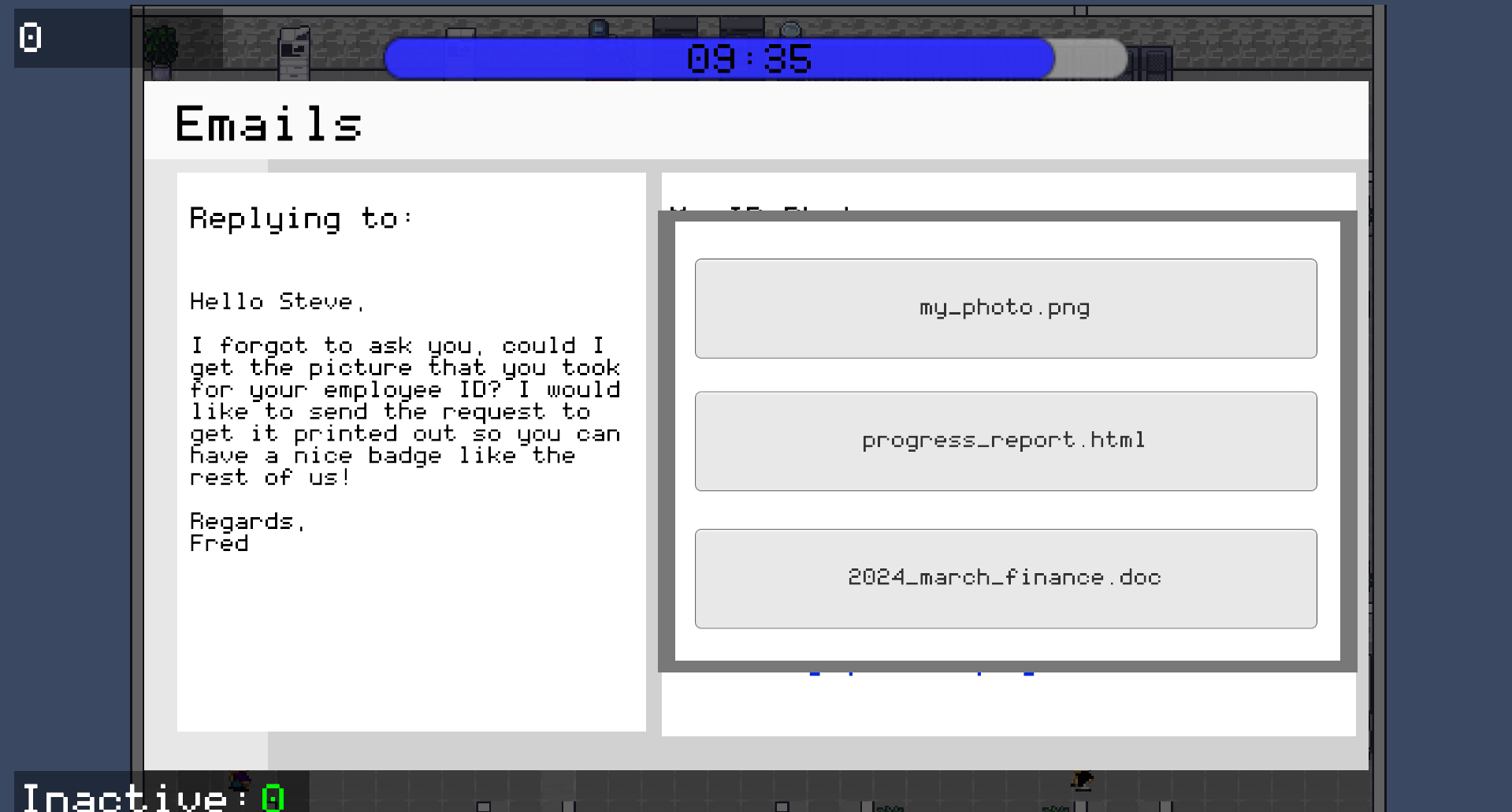
Compose-email reply screen UI in Unity
The Office & NPC System: Insider Threats
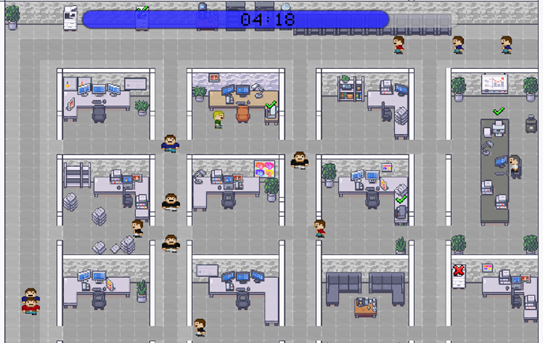
NPCs walking around the office randomly along the grid in Unity
Insider threats and physical security risks were represented through the office environment. NPCs move around the office throughout each level following a grid-based movement system. If the player leaves their desk without logging out of their computer, there is a chance that a passing NPC will tamper with it, resulting in a point deduction. This mechanic directly represents the risk of leaving a device unlocked and unattended in a shared workspace.
To create situations where the player must leave their desk, a machine maintenance minigame was implemented. Devices around the office break at random intervals, and leaving them broken for too long also results in a point deduction. This creates a recurring conflict between staying at the computer to manage emails and moving around the office to maintain equipment, while ensuring the screen remains locked when unattended.
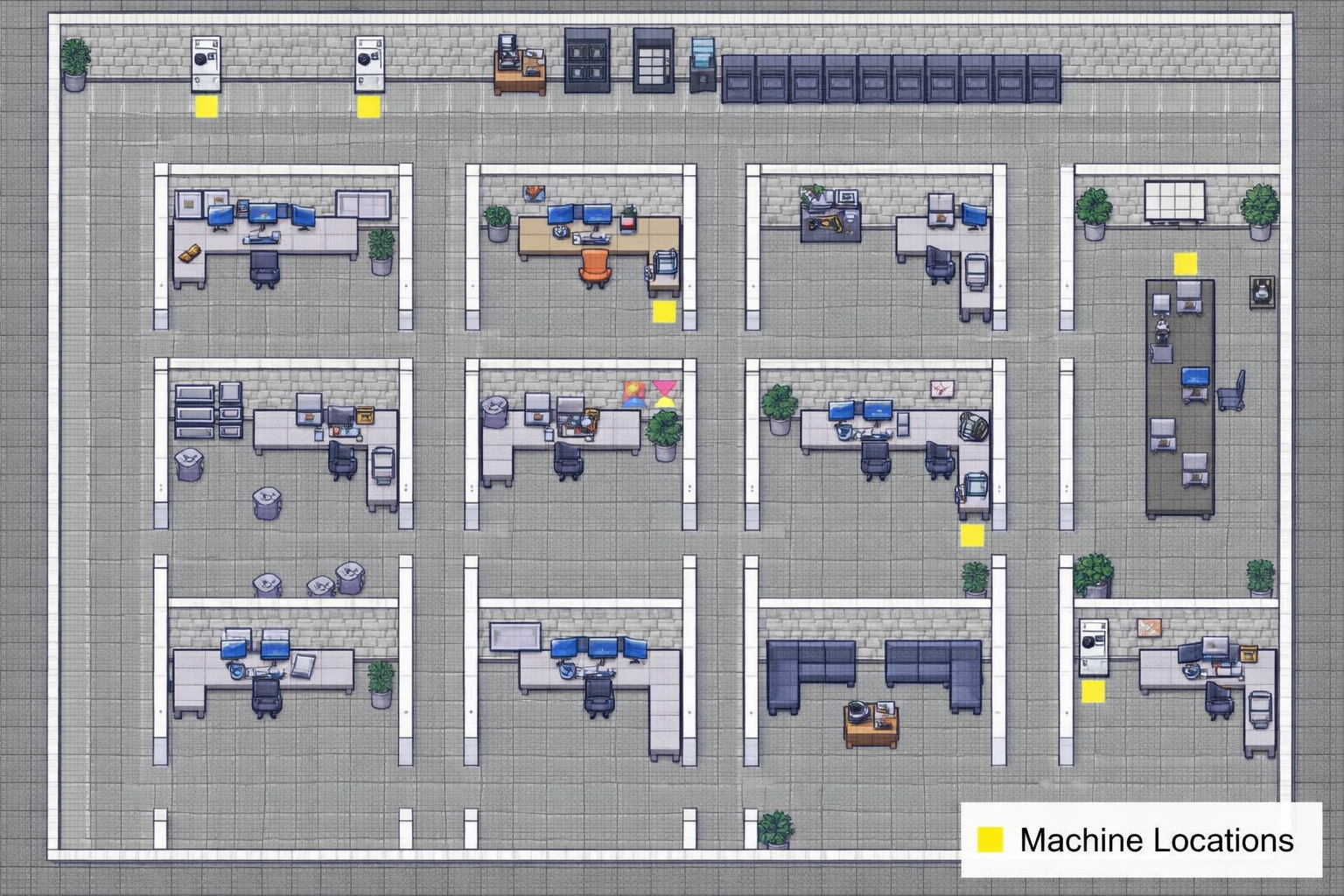
Office marked with machine locations that must be fixed if broken
The Passcode Scanner: Brute Force & Weak Passwords
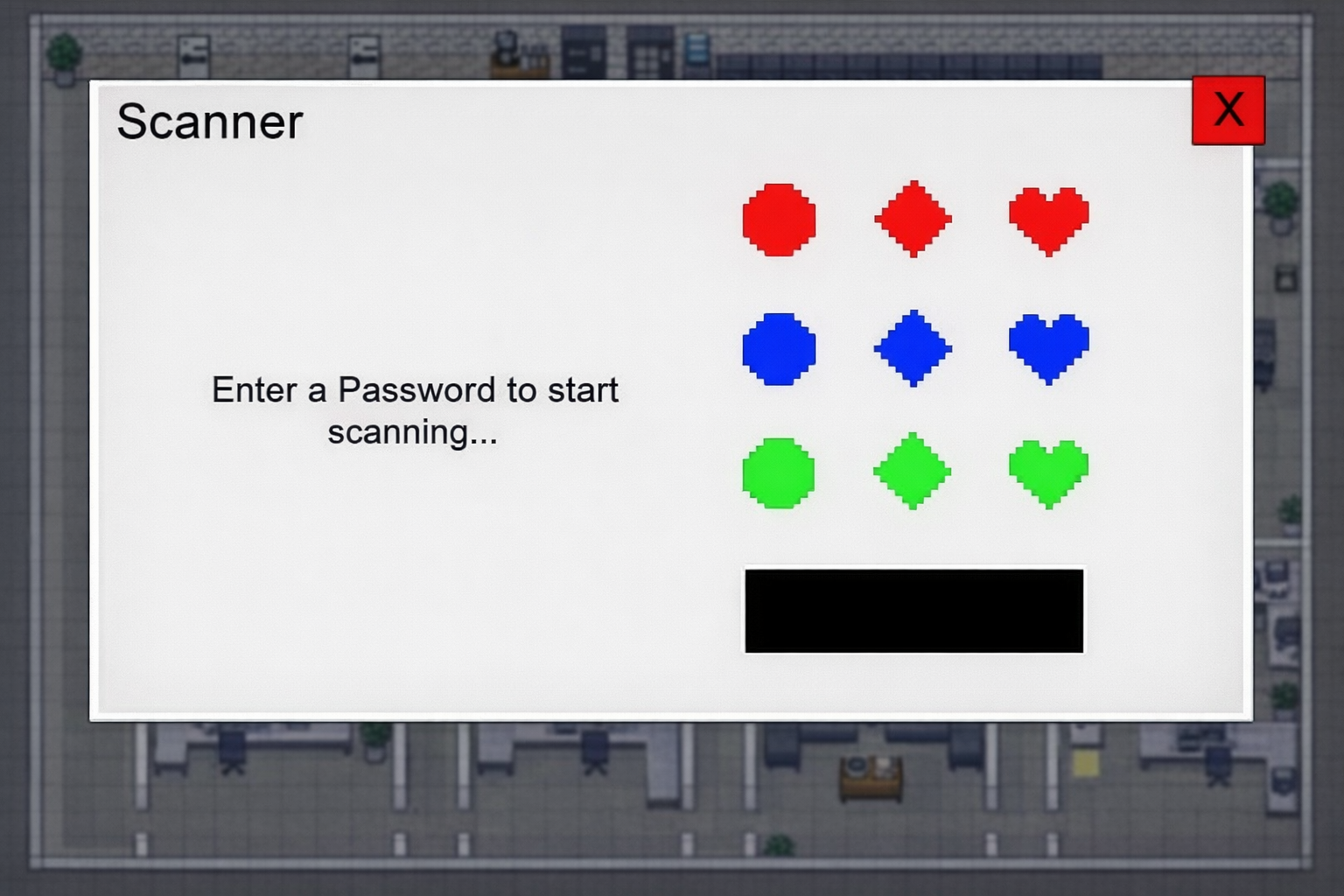
Passcode Scanner Mock-Up
The passcode scanner is triggered by specific emails and requires the player to leave their desk and interact with a physical scanner object in the office. The player creates a passcode using a grid of coloured symbols (circles, diamonds, and hearts in red, blue, and green) to begin a document scan.
The scan takes approximately 15 seconds to complete, during which the player is expected to return to other tasks. Once complete, the player must re-enter the same passcode from memory within three attempts.
The passcode is evaluated against four criteria: length, colour diversity, shape diversity, and whether it forms a simple repeating sequence. A passcode that fails any of these criteria results in a point deduction, regardless of whether it was recalled correctly. This is designed to reinforce the understanding that a memorable but weak password offers little real protection.
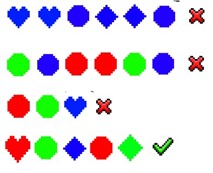
Examples of good and bad passcodes
The Wi-Fi System: Man-in-the-Middle Attacks
The Wi-Fi mechanic runs automatically in the background from the start of the level. The company network connection degrades gradually over time, moving between connection strength states. If the connection is poor enough, the player is automatically switched to an unsecured street network, at which point points begin to deplete for as long as the unsecured connection remains active.
The player can monitor connection strength through the settings screen and troubleshoot it before it drops, or reconnect after a dropout. Both actions consume time. The mechanic is intended to build awareness of network security as an ongoing responsibility rather than a one-time action.
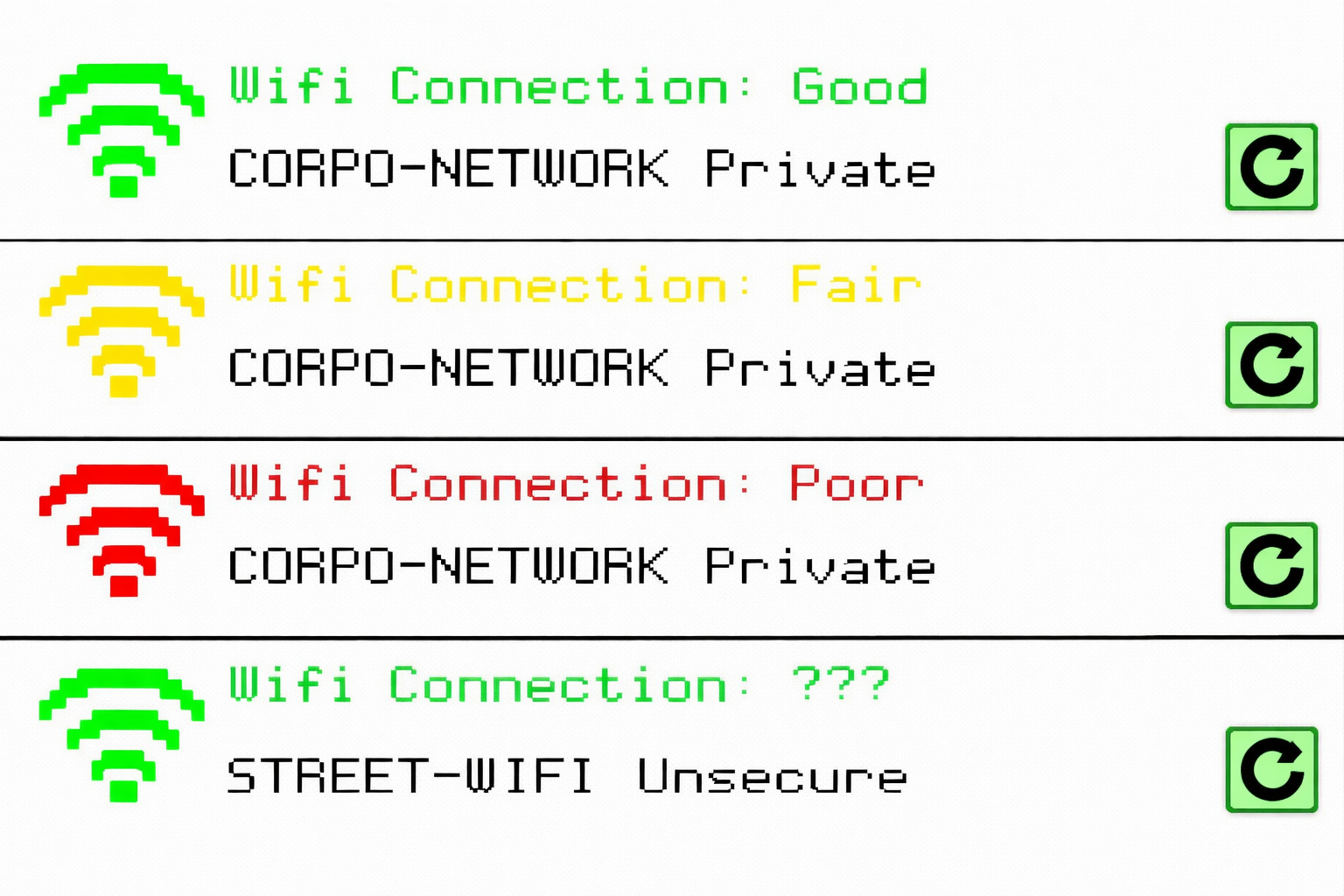
Wi-Fi connections and their statuses
The story layer
The game's story was designed to contextualise the mechanics and give players a reason to engage with the cybersecurity content beyond the gameplay alone. Each mechanic is introduced through character dialogue, which also advances the plot and establishes why each threat matters in the context of Steve's situation.
Four characters carry the narrative: Steve, the player character; Mark, the negligent manager whose behaviour enables a hostile work environment; Fred, Steve's line manager who introduces new mechanics and offers guidance; and Q, a mysterious figure outside the Corpo building who provides background on the threats Steve will face each day.
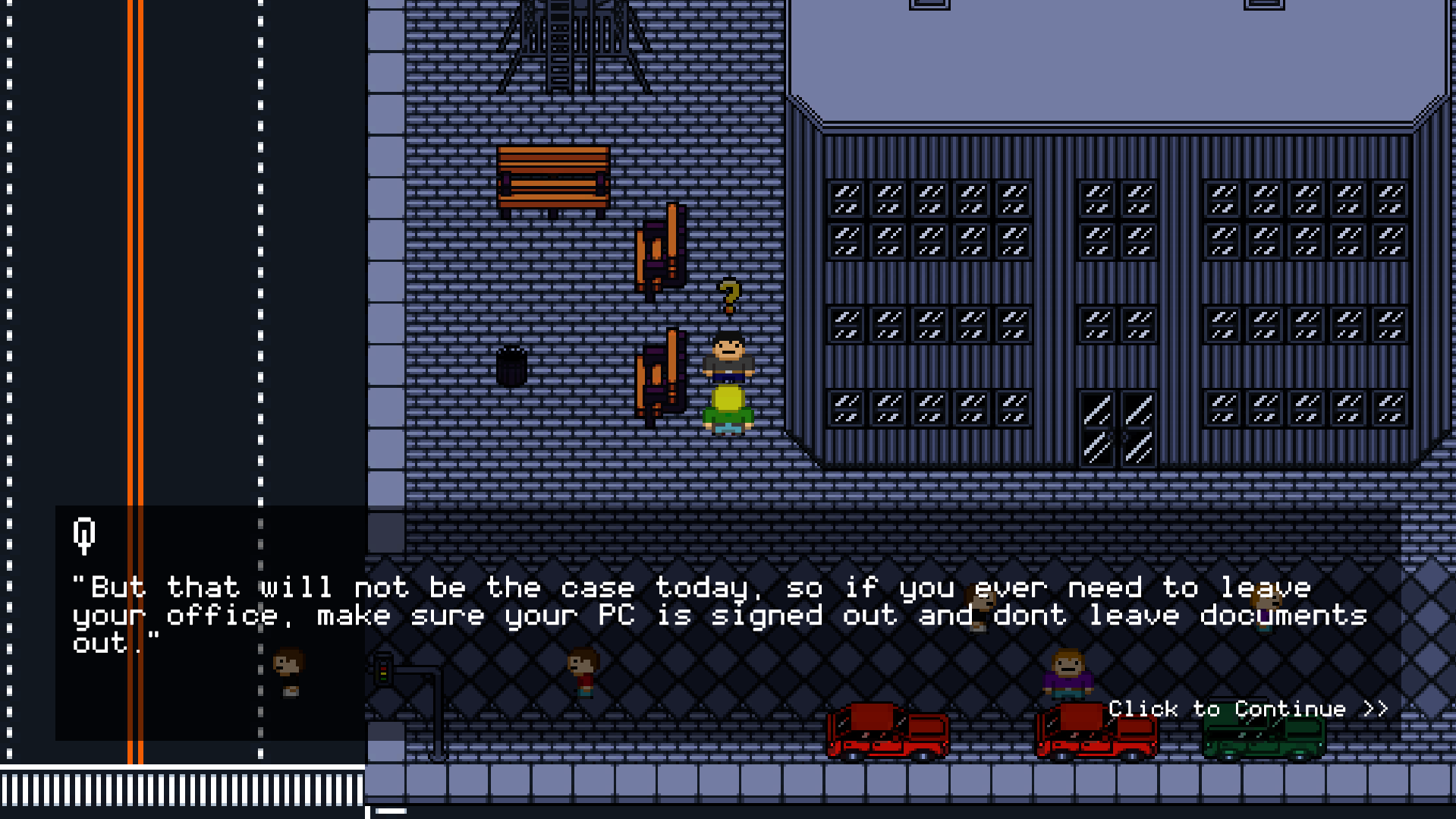
Dialogue Example 1
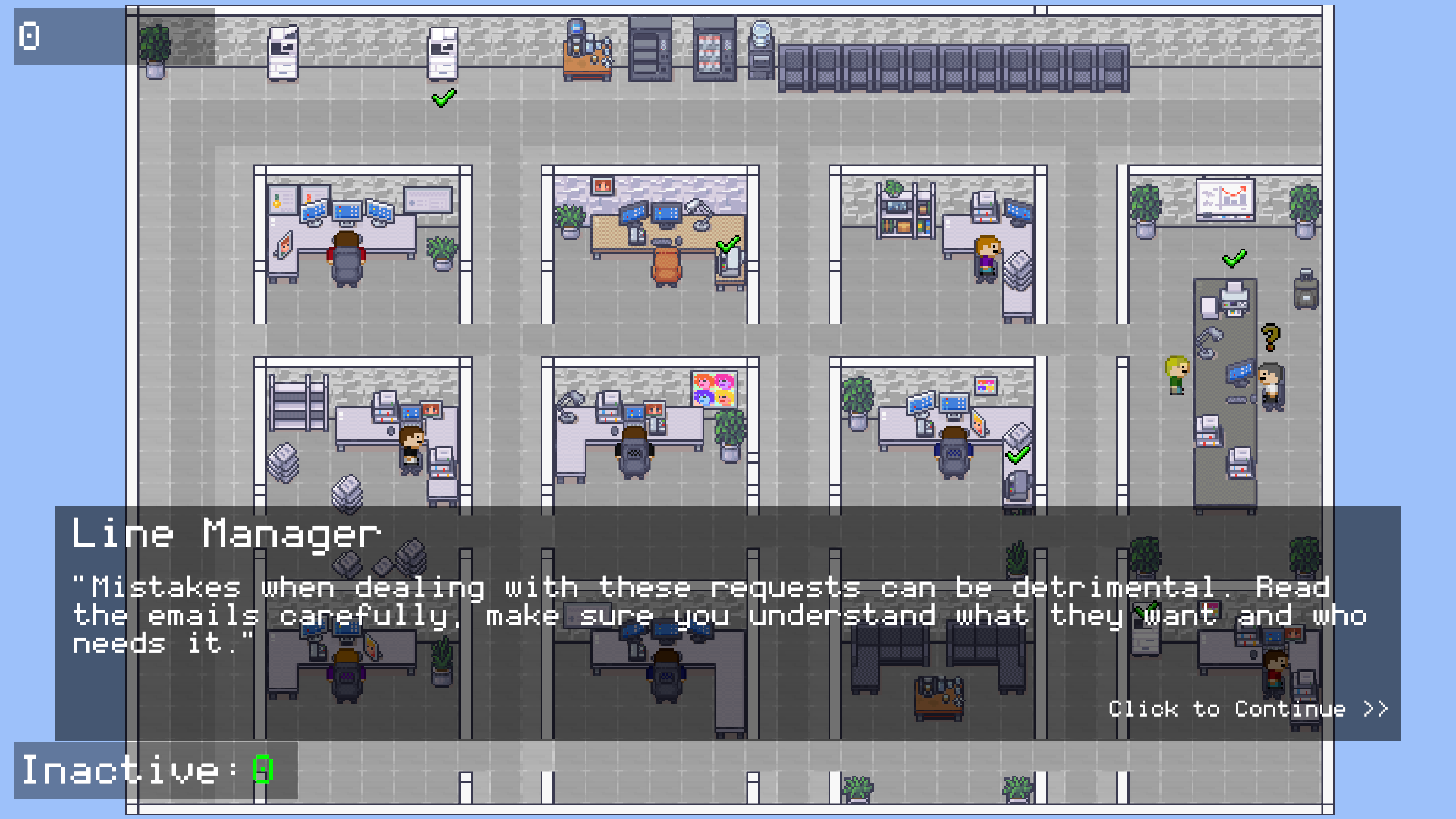
Dialogue Example 2
Mechanics are introduced progressively across each level, with each day adding new systems:
| Level | Mechanics Included |
|---|---|
| Day 1 | Email System |
| Day 2 | Email System, Machine Maintenance, Compose Emails |
| Day 3 | Email System, Machine Maintenance, Compose Emails, Passcode Scanner, Wi-Fi Connection |
| Day 4 | All of the above |
This gradual introduction avoids overwhelming players before they develop familiarity with each individual system. Introducing them one at a time allowed each mechanic to be understood and practised before the next was added.
Visual style
The game uses a pixelated 2D top-down perspective, built in Unity using open-source tilesets assembled in Tiled, a 2D map editor that exports directly into Unity. The visual style was chosen primarily for its clarity. A top-down office environment is immediately readable, character movement is easy to follow, and the aesthetic keeps the focus on the gameplay systems rather than the visuals. The overall look was loosely inspired by late-2000s top-down RPGs, particularly the overworld style of the early Pokémon series.

Pokémon Diamond and Pearl
The Implementation
The game was built in Unity 2D using C#, with maps designed in Tiled and imported directly into Unity. This section covers the implementation of the core systems, the technical decisions made during development, and some of the more interesting problems that came up along the way.
The Email System
The email system is built around two classes: email and emailManager. The email class acts as a data container, storing everything needed to define and display a single email within the game. Each email object holds:
emailTopic,emailSender,emailRecipients, andemailMessagefor display purposes- Two reply options, each with an assigned integer result value on a scale of 1 to 4, plus a separate
reportResultfor the Report action - An
emailTypestring classifying the email as safe, malicious, phishing, or spoofing - An
isMinigameboolean andminigameTypestring for emails that trigger additional mechanics
Compose-email objects extend this with additional fields: three recipient options, three attachment options, and integer values identifying the correct choice for each. Everything a compose-email needs to function is self-contained within the object itself.
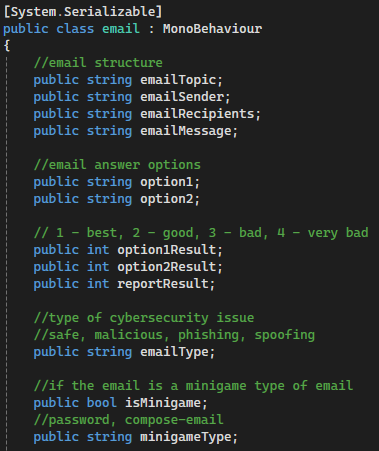
Part of the email class
The emailManager holds all emails for a given level in a list called emailQueue and manages the UI that displays them. When updateInbox() is called, if fewer than five emails remain in the queue, blank email objects are temporarily added to bring the count up to five, all five preview button slots are updated from the list, and the blanks are then removed. This keeps the UI consistently populated without requiring separate logic for partially filled inboxes.
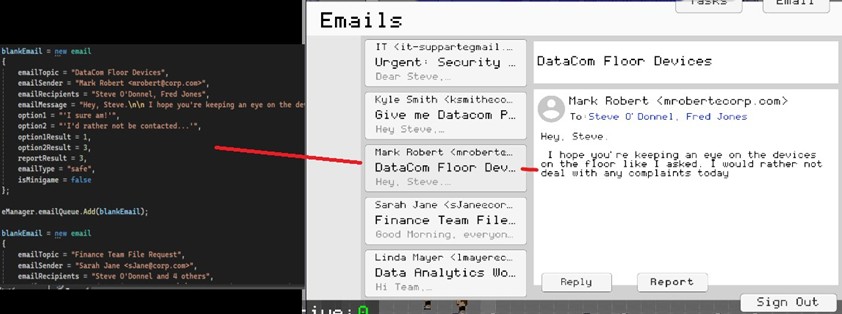
email object in C# called to game UI
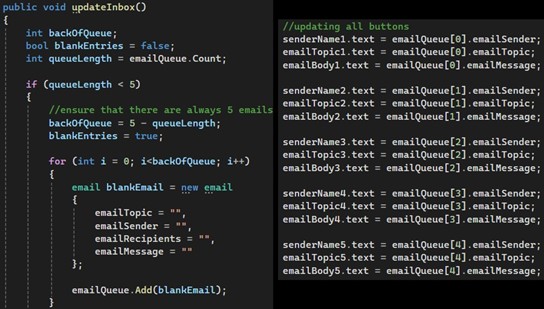
Parts of the updateInbox method in emailManager
When the player selects an email, currentEmail is updated to track which slot is active. This is a 1-indexed value while emailQueue is 0-indexed, so removeEmail() compensates by using currentEmail - 1 when calling RemoveAt(). Getting this offset wrong would consistently remove the wrong email from the queue, so maintaining that synchronisation across every interaction (clicking an email, answering it, closing the computer mid-level) was the central challenge of this system.
When the player responds to an email, the result value for the chosen option is passed to the scoreManager, which handles point allocation. Emails flagged as minigames open a secondary screen upon a correct reply. Compose-email types require the player to select the correct recipient and attachment before sending, with each field evaluated independently by the scoreManager.
Compose-email reply screen UI in Unity
The NPC & Office System
The office environment uses two types of NPC: regular NPCs, which appear in outdoor scenes and move randomly within a defined zone, and office NPCs, which follow a grid-based movement system inside the main office area.
Office NPCs spawn at the start of each level and navigate the office using a network of nodes. When an NPC reaches a node, the node's switchDirection method evaluates which directions are enabled for that position and randomly selects one. If no directions are enabled, the NPC stops. This produces varied movement paths across the office without every route needing to be manually scripted.
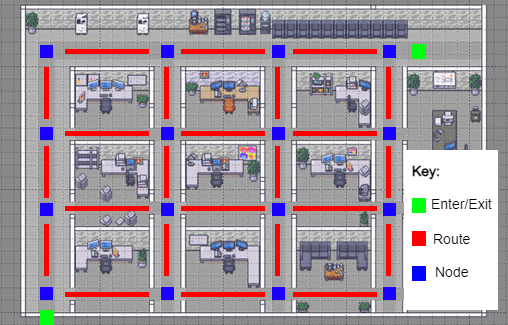
Movement pattern for NPCs in the office
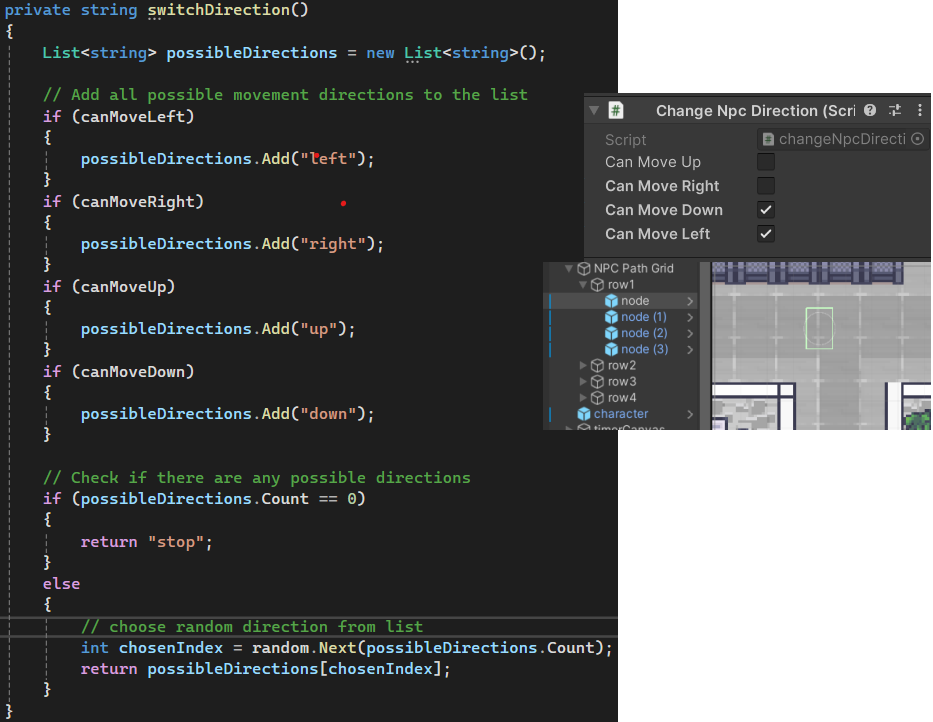
switchDirection method on each node in the grid
The security mechanic is handled by a trigger zone around the player's cubicle, managed by the playerOfficeCheck script. This zone tracks two things independently: whether the player is inside it, and whether any NPCs are inside it. If an NPC enters the zone while the player is absent and the computer is still logged in, Random.Range(0, 2) is called; a result of 1 triggers vulnerablePC() on the scoreManager, deducting points. The 50% chance reflects the unpredictable nature of insider threats rather than making the penalty feel automatic or unfair.
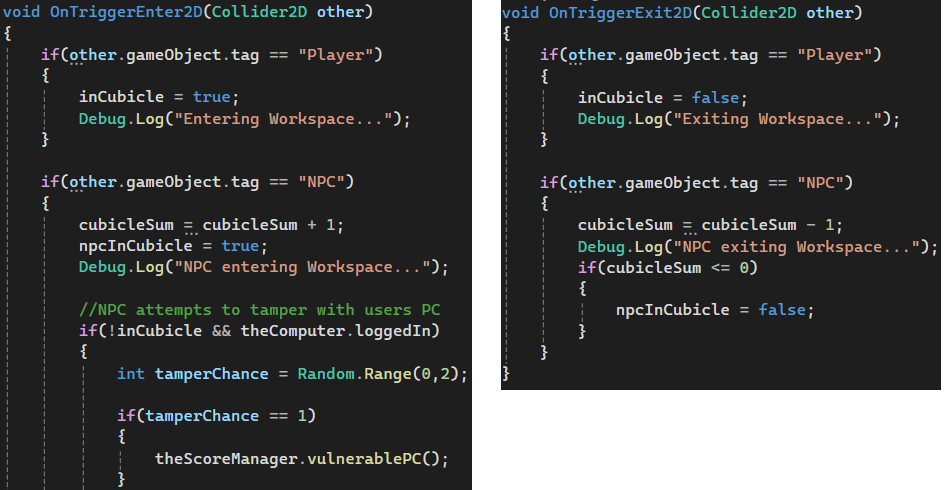
TriggerEnter and TriggerExit scripts for the playerOfficeCheck script
Devices around the office are assigned a random chance to break at set intervals, managed by the game manager. The player fixes them by walking to the device and interacting with it, which triggers a repair method and removes the broken status marker from both the HUD and the map.
The Passcode Scanner
The passcode scanner is a self-contained minigame triggered by emails with a minigameType of "password". The player must leave their desk and interact with a physical scanner object in the office to begin.
The player creates a passcode by selecting from a grid of nine coloured symbols — circles, diamonds, and hearts in red, blue, and green. Each symbol maps to an integer value from 1 to 9, and the entered passcode is stored as a list of integers. A switch statement in scannerController handles both adding each symbol's value to the list and placing the correct symbol graphic in the correct position on the UI.
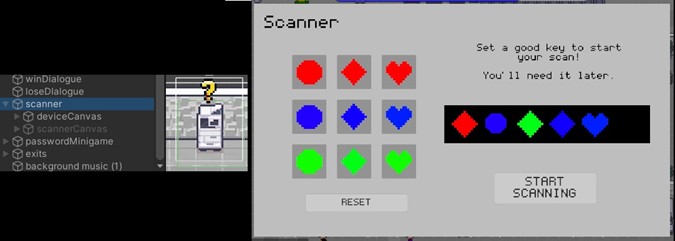
Scanner object and scanner UI
Once the passcode is set, scanning begins and takes approximately 15 seconds to complete. The player is expected to return to other tasks during this time. When the scan finishes, the player must re-enter the passcode from memory within three attempts.
The passcode is evaluated against four criteria by the passwordMinigame class:
- Length: the passcode must be longer than three symbols
- Colour diversity: symbols are grouped by colour (Red: 1,2,3 / Blue: 4,5,6 / Green: 7,8,9) and more than one colour group must be present
- Shape diversity: symbols are grouped by shape (Circle: 1,4,7 / Diamond: 2,5,8 / Heart: 3,6,9) and more than one shape group must be present
- Simple sequence check: the
isSimpleSequencemethod iterates through the list and returns true if every value increments by exactly 1, flagging predictable patterns as weak
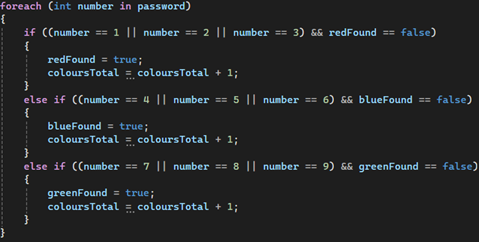
For loop for the colourCount method in passwordMinigame
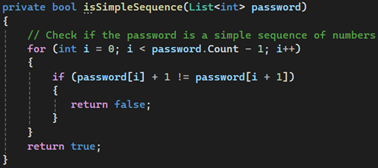
isSimpleSequence method in passwordMinigame
Each criterion that fails is reported to the scoreManager independently, meaning a passcode can lose points for being short, lacking diversity, and being a simple sequence all at once. This was a deliberate design decision, as it reinforces that password strength is not a single property but a combination of several habits applied together.
Game & Level Management
The gameManager is the central script that controls the state of the game. It coordinates the start and end conditions of each level and acts as the point of communication between all other major systems.
When a level begins, the gameManager triggers three things simultaneously:
- The
countdownTimerstarts counting down - The
NPCSpawnerbegins populating the office with NPCs - The
connectionStatusscript starts the Wi-Fi degradation cycle
When the emailQueue reaches zero, the emailManager signals the gameManager to call the win sequence. The gameManager also monitors the scoreManager continuously. If the player accumulates too many high-severity mistakes, the loss sequence is triggered before the timer expires.
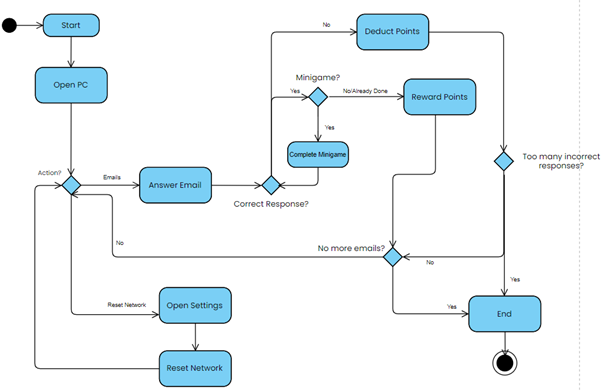
Gameplay Activity Diagram
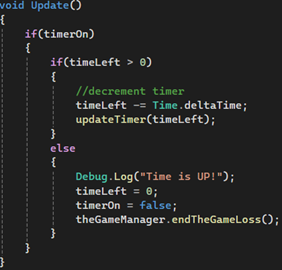
Timer countdown functionality from the timer script
The countdownTimer script holds a timeLeft float that decrements every frame while timerOn is true. When timeLeft reaches zero, it calls endGameLoss() on the gameManager directly. During development, a unit test revealed that this call was missing; the timer was reaching zero and stopping without triggering the loss sequence. This was identified and resolved promptly.
The Wi-Fi system runs on a separate connectionStatus script that manages a connectVal integer ranging from 5 to 0. At set intervals, wifiShift() is called, which uses Random.Range(0, 100) and a switch statement on the current connectVal to determine whether the connection goes up, stays the same, or goes down. The probability of degradation increases as connectVal decreases: at a value of 5 the connection always drops by one, while at higher values there is a chance it holds or recovers. At zero, the player is moved onto an unsecured network and the scoreManager begins applying a continuous point deduction until the connection is restored.
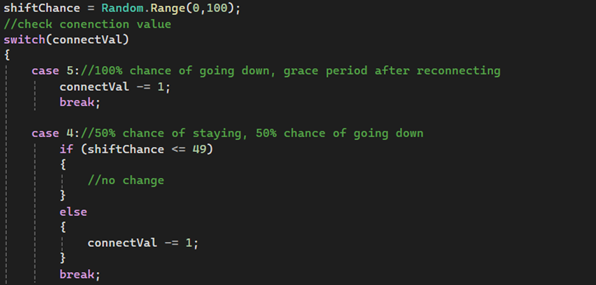
Part of the wifiShift method in the systemStatus class
Settings UI at connection values 3 to 0
Unit testing was the main method used to validate each system as it was implemented. Testing individual components in isolation allowed issues to be identified and fixed early. The game manager unit tests in particular surfaced some synchronisation issues, which I resolved before moving on.
Results & Evaluation
Pre-Game Findings
Before playing, participants completed a survey measuring their existing cybersecurity knowledge, habits, and attitudes. Key findings:
Knowledge & Confidence
- Participants rated their overall cybersecurity knowledge as moderate on average, somewhere between complete beginners and confident experts
- Threat recognition confidence was slightly higher than general knowledge, but most participants only rated themselves slightly above average
- Phishing was the most widely recognised threat, with malware and ransomware close behind, while network-based threats like Man-in-the-Middle and Wi-Fi eavesdropping were far less recognised
- Only around 50% of participants felt confident recognising social engineering attempts
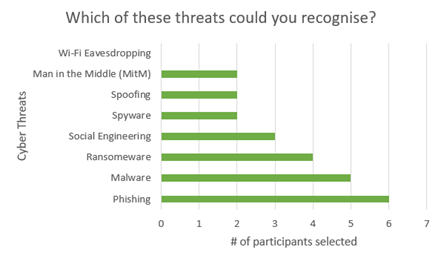
Threat recognition results
Habits
- Only 17% of participants updated software immediately when prompted; 50% waited for reminders and 33% left it until automatic updates kicked in
- Only around 33% of participants used completely different passwords across all their accounts, with 17% admitting to using the same password everywhere
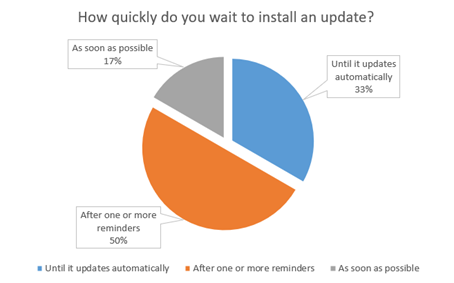
Install updates question
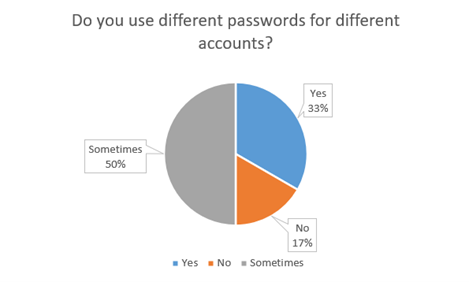
Password habits
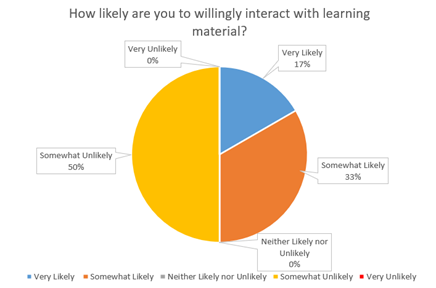
Cybersecurity learning willingness
Attitudes
- Participants almost unanimously rated cybersecurity as highly important in their daily lives, with an average importance rating of 4.5 out of 5
- Despite this, 50% said they were outright unlikely to engage with cybersecurity learning material outside of mandatory settings
- Only 17% said they were very likely to do so voluntarily
These results established a clear picture going in: participants understood that cybersecurity mattered, but their habits didn't reflect that, and their appetite for engaging with the topic on their own terms was low.
Post-Game Findings
Knowledge & Threat Recognition
- Overall self-rated cybersecurity knowledge increased by approximately 33% on average after playing
- The largest improvements came from participants who rated themselves lower before playing, while more experienced participants saw little to no change in their knowledge ratings
- Despite this split, every single participant felt more confident identifying at least one type of cyber threat after playing
- Social engineering saw the greatest improvement in recognition, with nearly every participant selecting it as a threat they could now better identify
- Understanding of who poses a cybersecurity threat saw the most significant improvement of any survey question. Recognition of employees, managers, and trusted individuals as potential threats improved dramatically compared to pre-game responses
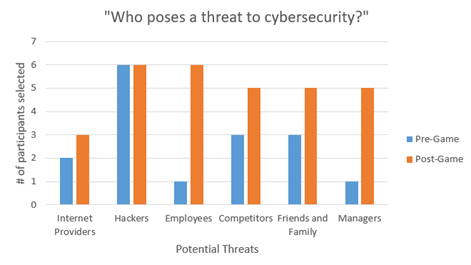
Threat identification comparison
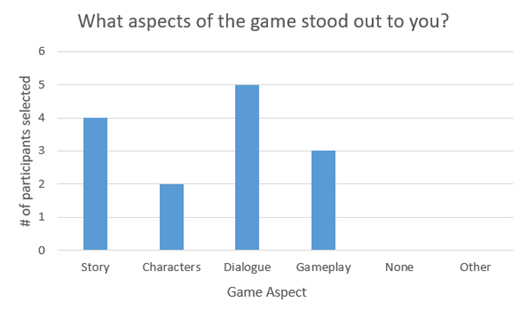
Standout aspect ratings
Engagement
- The game received an average engagement rating of 7.67 out of 10
- Story and dialogue were consistently identified as the standout aspects of the experience
- Gameplay was a secondary but still notable factor in the high engagement scores
Learning Preference
- 100% of participants said they preferred this method of learning over the method they had previously identified as their favourite, including reading, lectures, and videos
- Participants were evenly split between those who would return to a fuller version of the game for learning purposes and those who would return purely for entertainment
- 83% indicated a willingness to pay to access an expanded version of the game
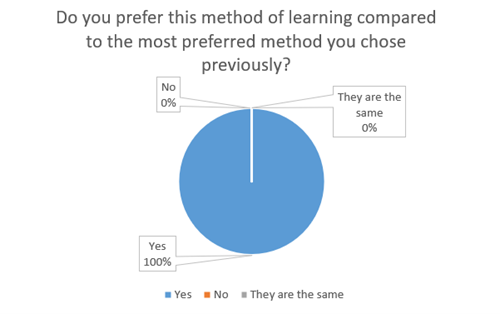
Learning method preference
Evaluation
The results highlighted a meaningful distinction between the game's ability to teach and its ability to train. For participants with less prior knowledge, the game functioned well as an educational tool, introducing concepts through story and reinforcing them through mechanics. For those with more experience, it offered less in terms of new information, but still improved their confidence in recognising specific threats through repeated, pressured exposure to them.
The story proved to be the most impactful element overall. The improvement in participants' understanding of who can pose a cybersecurity threat, including people within an organisation, was largely attributed to the narrative rather than any specific mechanic. This supported the core design hypothesis: that embedding cybersecurity concepts in an engaging story makes the information feel more relevant and worth retaining.
The weakest area was the negative feedback loop. Losing points or failing a level does not meaningfully replicate the real consequences of a data breach, and participants reflected this in their responses. A more impactful penalty system, one that visibly affected gameplay in ways tied to the specific mistake made, would have strengthened the training aspect of the experience considerably.
Overall, the game demonstrated real potential as a complement to existing cybersecurity awareness methods, particularly for audiences who would not voluntarily engage with traditional training material. The unanimous preference for this learning method, even among participants who felt their knowledge hadn't improved, suggests that the engagement problem this project set out to solve was addressed, even if the depth of information delivered still has room to grow.
My Reflection
Going into this project, I underestimated how much work game development actually takes. My experience with both Unity and C# was limited at the start, and that learning curve had a real impact on how much I was able to deliver. As the deadline approached, a significant number of planned features had to be cut: randomised AI-generated emails, additional gameplay environments beyond the main office, a database for tracking player performance across sessions, and a more sophisticated penalty system where mistakes would affect gameplay directly rather than simply deducting points. These cuts were necessary, but they also represent the clearest picture of where the project could grow.
In terms of the solution itself, I think the results were honest about both its strengths and its limitations. The game worked well as an awareness tool for those with less prior cybersecurity knowledge, and the story-driven approach to delivering information proved more effective than I initially anticipated. However, it fell short of matching the informative depth of formal training courses for those who had already been through them. In its current state I see it as a complement to existing methods rather than a replacement, filling a gap that campaigns and courses both struggle with: reaching people who wouldn't seek out the topic on their own terms.
There is a lot I would still like to do with this project. Generative AI producing dynamic, randomised emails for each playthrough would give the game genuine replay value and make the phishing detection mechanic considerably harder to game with familiarity. Expanding the gameplay to new environments (a café, a home setting) would introduce network and physical security concepts in a more varied and memorable way. And building out the penalty system so that mistakes have visible, gameplay-affecting consequences would bring the experience closer to the simulation standard that makes serious games genuinely effective as training tools. I had a lot of fun building this, and I have every intention of taking it further.